Administration Console
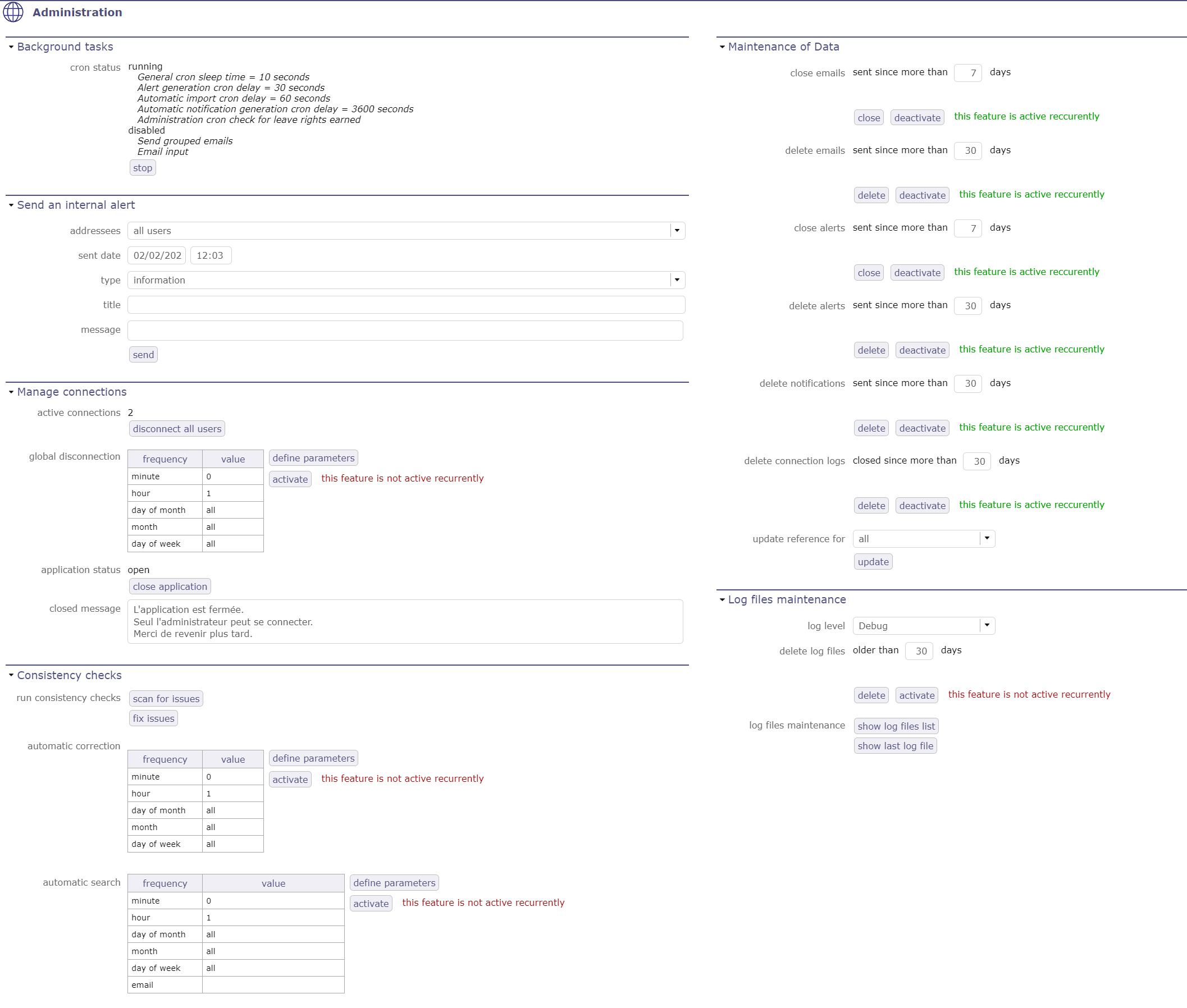
Administration screen
Note
The screens described below are restricted to users with administrator profile.
Users with other profiles can not access it, whether display or access rights are granted or not.
Administration console allows to execute administration tasks on application.
Background tasks
the CRON
The CRON program starts and stops background jobs that process and periodically check indicators to generate the corresponding alerts, warnings or even automatic imports if necessary.
Cron execution works like cron linux process
This program automatically runs scripts, commands, or software at a specified date and time, or a pre-defined cycle.
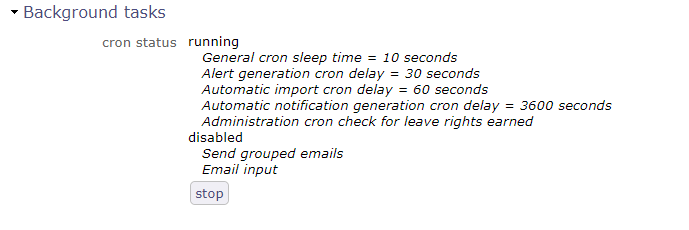
Background tasks is running in Administration console
You can activate or deactivate CRON directly from the info bar.

CRON activation button
Behavior
* * * * *
│ │ │ │ │ L day of week
│ │ │ │ L month
│ │ │ L day of month
│ │ L hour
│ L minute
For instance for minutes
* * * * * = means every minute every day

5 * * * * = means every hours at 5 minutes (0:05, 1:05, ... to 23:05)

0 5 * * * = means every day at 5:00

*/5 * * * * = means every 5 minutes every, so will run at 0:00, 0:05, 0:10

0 */2 * * * = means every 2 hours at 0 minutes, so will run at 0:00, 2:00, 4:00
For minutes This works on cron execution must be set manually
*/5 : every 5 minutes

*/10 : every 10 minutes

*/15 : every 15 minutes

*/30 : every 30 minutes
For hours This works on cron execution must be set manually
*/2 : every 2 hours

*/3 : every 3 hours

*/4 : every 4 hours

*/6 : every 6 hours

*/8 : every 8 hours

*/12 : every 12 hours
See also
Send an internal alert
Allows to send an internal alert to users.
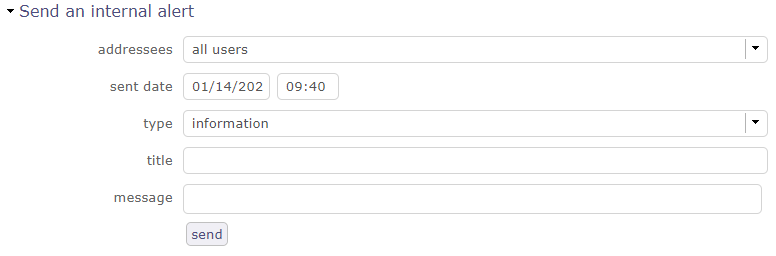
Internal Alert
Internal alerts can be sent to users.
You can define a date and time for sending, specific adressees or all users, the type of message that users will receive: information, an alert or a warning…
This can be a good step to warn users before a temporary shutdown of ProjeQtOr for update for example.
An internal alert can be sent by the administrator or by monitoring indicators.
By the administrator
The administrator can send internal alert by administration console.
The message will be received by user via message pop-up.
Monitoring indicators
Monitoring indicators send only warning and alert message.
The message contains information that explains the alert:
Item id and type.
Indicator description.
Target value.
Alert or warning value.
See also
The indicators are defined in Indicators screen .
Manage connections
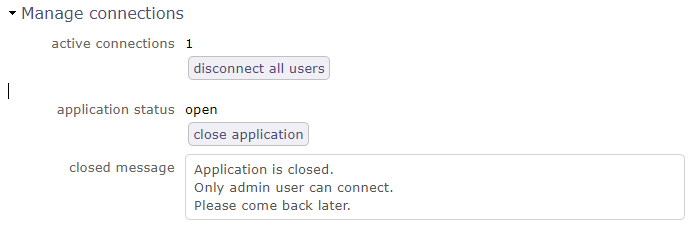
Manage connections
Allows to force disconnection of active users and close the application for new connections.
Disconnect all users
The button Disconnect all users allows to disconnect all connected users except your own connection.
The application status is displayed below.
Disconnection will be effective for each user when his browser will ckeck for alerts to be displayed.
The delay for the effective disconnection of users will depend on the parameter “delay (in second) to check alerts” in Global parameters screen.
Open/Close application
The button Open/Close application
Allows to open and close application.
When the application is closed the message below will appear on login screen.
Consistency check
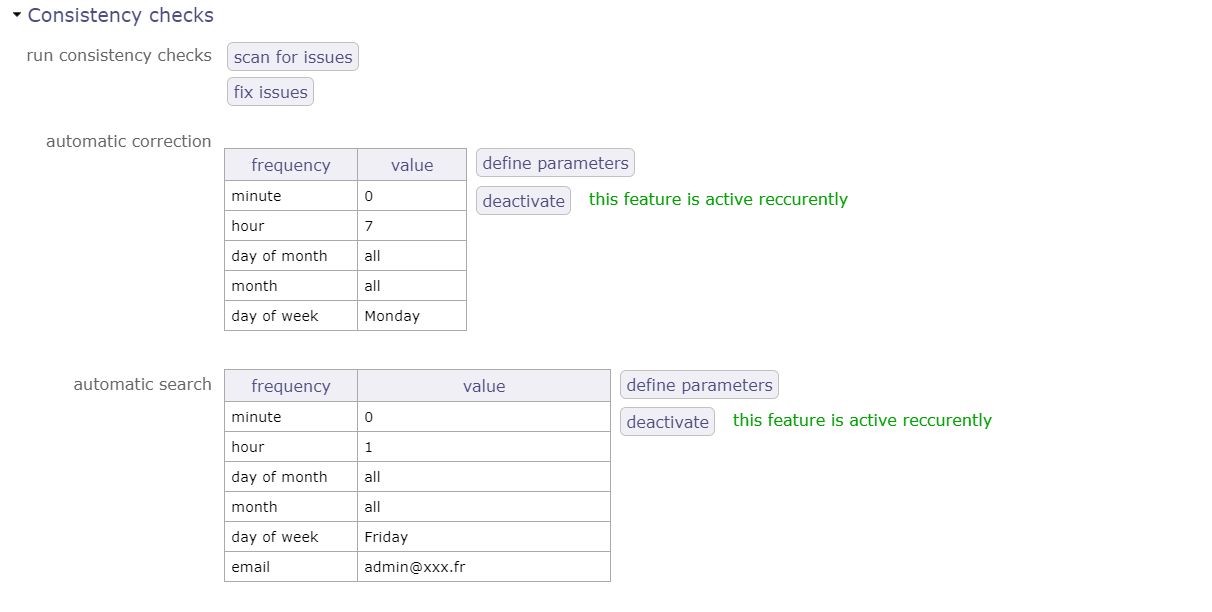
consistency check
on the WBS sequence search for duplicates, sequence holes, incorrect order
on the presence of one and only one line of “PlanningElement” for the planifiable elements
on the consolidation of ticket work
on consolidation of work on activities
on assignments
You can program the search for the consistency check as well as its execution.
Set the desired frequency settings and activate the service.
Maintenance of Data
The administrator has the possibility to:
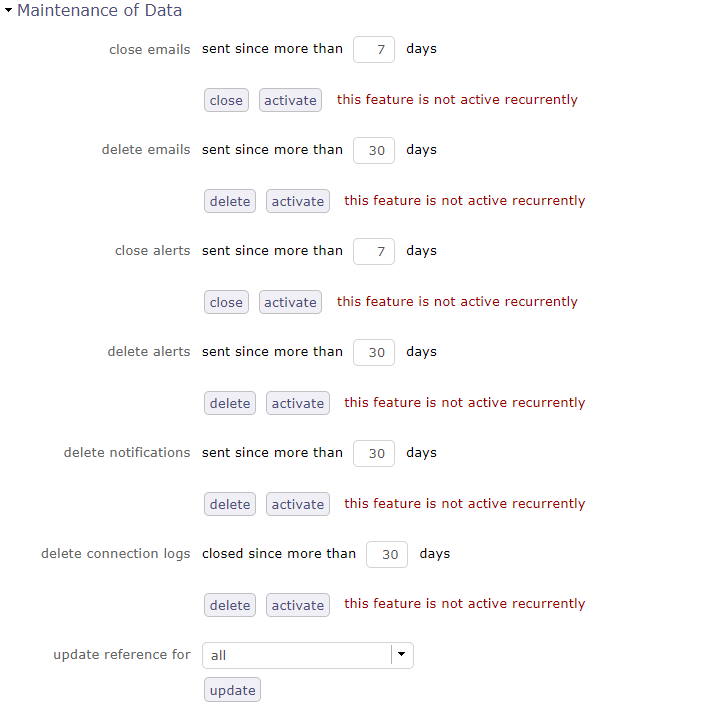
Maintenance of datas
Close and delete sent emails and alerts.
Delete history of connections.
Updating references for any kind of element.
You can automate these cleanings by activating them using the corresponding buttons.
Log files maintenance
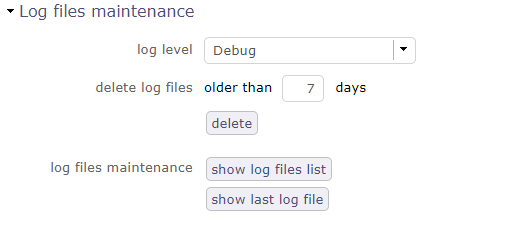
Log files maintenance
The administrator has the possibility to choose the level of the log files among debug, trace, script and errors.
delete files on a given number of days.
Show the list of logs
Show the last logs list.
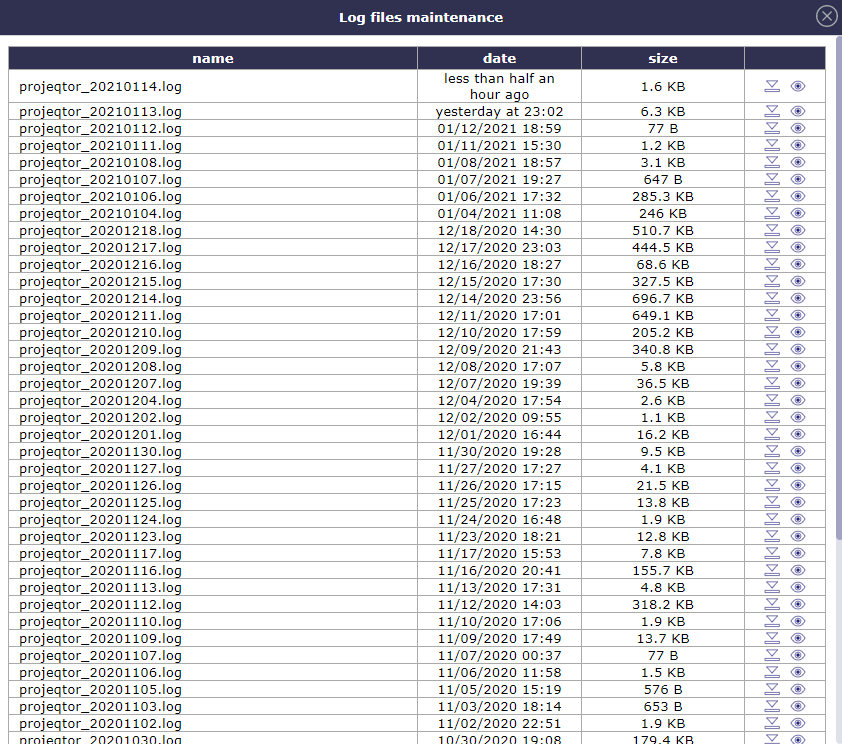
Log files list
Ordering projects by priority
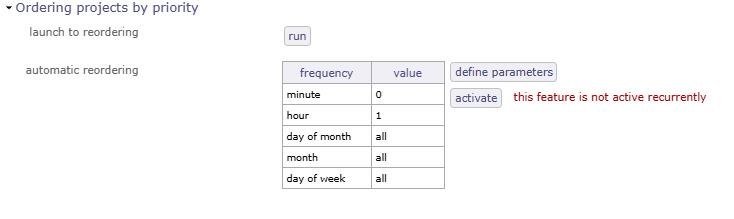
Ordering project by priority
You can list projects in priority order rather than WBS order across a set of reports using this administration feature.
This reordering can only be performed within the same project level.
Reports that can benefit from priority ordering include:
Workload plans (weekly, monthly),
Planning reports (monthly and annual, project resources and project resources),
Monthly planning colored by resource (fixed or not).
API REST 2
ProjeQtOr provides an API to interact with its elements. It is provided as a REST web service.
The GET, PUT, POST and DELETE methods are used for elements.
For security reasons, the API is not enabled by default.
Note
The API can be completely disabled by adding $paramDisableAPI=true; in parameters.php.
Authentication
Three authentication modes are available. The mode is selected by the Authorization header sent by the caller. There is no fallback from one mode to another.
Mode |
Authorization header |
Checked by |
Secret |
|---|---|---|---|
Basic (legacy) |
|
The web server |
API key of the user (field API key on the user), used to encrypt the data of PUT, POST and DELETE |
Bearer |
|
ProjeQtOr |
API key generated in ProjeQtOr, sent with each request (HTTPS required) |
Signature |
|
ProjeQtOr |
API key generated in ProjeQtOr, used to sign each request (never sent) |
Whatever the mode, the authenticated user must exist in ProjeQtOr and must not be closed or locked.
The access rights of the user (read, create, update, delete) apply to all API calls. This allows you to provide some access to external users and control the visibility they get on your data.
Basic authentication (legacy)
User and password are checked by the web server, with a .htpasswd file. Existing API consumers keep working with no change.
Generate a .htpasswd file to see related topics on the net. A template is provided in /api/.htpasswd, referencing the user projeqtor and password projeqtor.
It is provided for testing purposes only. Do not use it in a production environment as it will expose all your data.
With Apache, create the file /api/.htaccess from the template /api/.htaccess.example, and update it to specify the location of your .htpasswd file:
AuthUserFile “/pathToFile/.htpasswd” The default location is the Apache directory.
ProjeQtOr only trusts the user validated by the web server (server variable REMOTE_USER), never the user name sent by the caller.
With Apache, nothing else is needed.
With another web server (nginx, IIS…), Basic authentication must be enforced on the /api/ directory in the server configuration (see Web server configuration), then declared as trusted in parameters.php :
$paramApiTrustServerAuth=true;
If Basic authentication is not enforced by the web server, calls are refused with a message explaining how to fix the configuration.
For PUT, POST and DELETE, data must be encrypted with the API key of the user (see How the API works).
Warning
The API key of the user used with Basic authentication (32 characters) is refused for Bearer and Signature authentication.
These modes only accept API keys generated as described below.
API keys
Bearer and Signature authentication use API keys generated in ProjeQtOr.
Access right
The profile of the user must be allowed to use the API with API keys : in Specific access, section API, set Use API with Bearer / Signature authentication (API keys) to “Yes”.
By default, only the administrator profile is allowed.
Generate an API key
Each user generates his own keys in User parameters, tab Profile, section API keys, button Manage API keys.
The administrator manages the keys of any user in the Users screen, section Miscellaneous, button Manage API keys. This allows to generate keys for technical accounts, used by connectors.
For each key, define :
Field |
Description |
|---|---|
Usage |
Generic, MCP connector or Integration. Allows to distinguish keys used for different purposes. |
Label |
Free description of the key, for instance the name of the application using it. |
Authentication |
Bearer and / or Signature : authentication modes allowed for this key. |
Access |
Read only (GET only) or Read and write. |
Expiration |
Optional date after which the key is refused. |
Important
The key is displayed only once, just after its generation : copy it and keep it safe.
It is stored encrypted in the database and can never be displayed again. If it is lost, revoke it and generate a new one.
A key looks like pqk1_abcdefghijkl_XXXXXXXXXXXXXXXXXXXXXXXXXXXXXXXXXXXXXXXXXXX :
pqk1_abcdefghijklis the public identifier of the key (key id), displayed in the list of keys and used by Signature authentication.The rest, after the last
_, is the secret.
The list of keys displays for each key its creation date (with the user who generated it, when it is not the owner), its last use (date, and IP address and application in the tooltip) and its status.
Click on the revoke button of a key to disable it : applications using it can no longer access the API.
Master key
API keys are encrypted in the database with a master key which is never stored in the database.
It is generated automatically on first use in the file apiTokenMasterKey.php, in the same directory as parameters.php. It can also be defined in parameters.php : $paramApiTokenMasterKey='...'; (base64 encoding of 32 random bytes).
Warning
Keep this file with the backups of parameters.php. If the master key is lost or changed, all API keys become unusable and must be generated again.
The PHP extension openssl is required to use API keys.
Bearer authentication
The API key is sent in the Authorization header of each request :
Authorization: Bearer pqk1_abcdefghijkl_XXXXXXXXXXXXXXXXXXXXXXXXXXXXXXXXXXXXXXXXXXX
As the key is sent with each request, HTTPS is required : calls over HTTP are refused.
Behind a reverse proxy handling HTTPS, declare the IP address of the proxy in parameters.php :
$paramApiTrustedProxies='10.0.0.1';(comma separated list). The proxy must send the headerX-Forwarded-Proto: https.For tests only, HTTP can be allowed with
$paramApiAllowBearerOverHttp=true;
For PUT, POST and DELETE, data is sent as plain json. It can also be encrypted like for Basic authentication, using the secret of the key as encryption key.
This request lists all Tickets :
$curl = curl_init("https://myserver/api/Ticket/all");
curl_setopt($curl, CURLOPT_HTTPHEADER, array("Authorization: Bearer " . $apiKey));
curl_setopt($curl, CURLOPT_RETURNTRANSFER, true);
$curl_response = curl_exec($curl);
echo $curl_response;
curl_close($curl);
This request updates the name of ticket with ID #1 :
$data='{"id":"1", "name":"name to be changed for Ticket 1"}';
$curl = curl_init("https://myserver/api/Ticket");
curl_setopt($curl, CURLOPT_HTTPHEADER, array("Authorization: Bearer " . $apiKey, "Content-Type: application/json"));
curl_setopt($curl, CURLOPT_CUSTOMREQUEST, "PUT");
curl_setopt($curl, CURLOPT_POSTFIELDS, $data);
curl_setopt($curl, CURLOPT_RETURNTRANSFER, true);
$curl_response = curl_exec($curl);
echo $curl_response;
curl_close($curl);
Signature authentication (HMAC)
Each request is signed with the secret of the API key. The key itself is never sent : an intercepted request can’t be modified, nor replayed, nor used to build other requests.
Authorization: Signature keyId="pqk1_abcdefghijkl", timestamp="1790000000", nonce="3f9c0b7e5a1d4c2b8e6f0a9d7c5b3e1f", signature="..."
Parameter |
Description |
|---|---|
keyId |
Public identifier of the key : |
timestamp |
Current time as a unix timestamp (seconds). Refused if it differs by more than 300 seconds from the server time. |
nonce |
Random string of 16 to 64 characters (letters, digits, |
signature |
Base64 encoding of the HMAC-SHA256 of the string to sign, with the secret of the key as HMAC key. |
The string to sign is made of 6 lines separated by a line feed (\n), with no line feed at the end :
METHOD
host
request uri
timestamp
nonce
body hash
METHOD : HTTP method in upper case (GET, PUT, POST, DELETE).
host : value of the
Hostheader, in lower case. It includes the port only when it is not the default port (e.g. myserver:8080).request uri : path and query string exactly as sent (e.g. /api/Ticket/1 or /api/index.php?uri=Ticket/1).
timestamp and nonce : same values as in the header.
body hash : SHA-256 of the body of the request, in lower case hexadecimal. For a request with no body (GET), SHA-256 of an empty string.
For PUT, POST and DELETE, data is sent as plain json, like for Bearer authentication.
Note
multipart/form-data POST requests are not supported, as their body can’t be signed : to send a file, use PUT (see attachment examples below).
This PHP function calls the API with Signature authentication :
function projeqtorApiCall($method, $url, $apiKey, $body='') {
  preg_match('/^(pqk1_[a-z2-7]{12})_(.+)$/', $apiKey, $m);
  $keyId=$m[1];   // public identifier of the key
  $secret=$m[2];  // secret part of the key, never sent
  $parts=parse_url($url);
  $defaultPort=($parts['scheme']=='https')?443:80; // Host header : port only if not the default one
  $host=strtolower($parts['host'] . ((isset($parts['port']) and $parts['port']!=$defaultPort)?':'.$parts['port']:''));
  $uri=$parts['path'] . (isset($parts['query'])?'?'.$parts['query']:'');
  $timestamp=time();
  $nonce=bin2hex(random_bytes(16));
  $stringToSign=strtoupper($method) . "\n" . $host . "\n" . $uri . "\n" . $timestamp . "\n" . $nonce . "\n" . hash('sha256', $body);
  $signature=base64_encode(hash_hmac('sha256', $stringToSign, $secret, true));
  $curl=curl_init($url);
  curl_setopt($curl, CURLOPT_CUSTOMREQUEST, $method);
  curl_setopt($curl, CURLOPT_HTTPHEADER, array(
    'Authorization: Signature keyId="' . $keyId . '", timestamp="' . $timestamp . '", nonce="' . $nonce . '", signature="' . $signature . '"',
    'Content-Type: application/json'));
  if ($body!=='') curl_setopt($curl, CURLOPT_POSTFIELDS, $body);
  curl_setopt($curl, CURLOPT_RETURNTRANSFER, true);
  $response=curl_exec($curl);
  curl_close($curl);
  return $response;
}

echo projeqtorApiCall('GET', 'https://myserver/api/Ticket/1', $apiKey);
echo projeqtorApiCall('PUT', 'https://myserver/api/Ticket', $apiKey, '{"id":"1", "name":"name to be changed for Ticket 1"}');
Web server configuration
The web server configuration has two roles :
Rewrite calls like /api/{objectclass}/{objectid} to /api/index.php?uri={objectclass}/{objectid}. Without it, call /api/index.php?uri=… directly.
Enforce Basic authentication for legacy calls, while letting Bearer and Signature calls reach ProjeQtOr, which authenticates them.
Bearer and Signature authentication don’t depend on the web server : they work with any web server, even with no specific configuration.
Apache
Copy /api/.htaccess.example to /api/.htaccess and set the location of the .htpasswd file.
Basic authentication is required, except for Bearer calls using an API key (
pqk1_) and for Signature calls.A legacy API key sent as Bearer is still challenged for Basic authentication.
Apache 2.4 is required for Bearer and Signature authentication. With Apache 2.2, Basic authentication is required for every call.
nginx
nginx doesn’t read .htaccess files. Example of configuration for ProjeQtOr installed at the root of the site, to adapt to your configuration :
map $http_authorization $projeqtor_api_auth {
    "~*^(Bearer pqk1_|Signature )"  off;
    default                         "ProjeQtOr API";
}

server {
    ...
    location ^~ /api/ {
        auth_basic           $projeqtor_api_auth;
        auth_basic_user_file /path/to/.htpasswd;
        rewrite ^/api/(?!index\.php)(.*)$ /api/index.php?uri=$1 break;
        include       fastcgi_params;
        fastcgi_param SCRIPT_FILENAME $document_root/api/index.php;
        fastcgi_pass  unix:/run/php/php-fpm.sock;
    }
}
Then declare Basic authentication as trusted in parameters.php : $paramApiTrustServerAuth=true;
Warning
Only declare $paramApiTrustServerAuth=true; if Basic authentication is really enforced on /api/ by the web server : nginx provides the user name sent by the caller even when no authentication is configured.
IIS
IIS doesn’t read .htaccess files, and its Basic authentication checks Windows accounts.
Use anonymous authentication on /api/, with Bearer or Signature authentication. Rewriting of /api/{objectclass}/… requires the URL Rewrite module : without it, call /api/index.php?uri=… directly.
Parameters
These parameters can be added in parameters.php :
Parameter |
Description |
|---|---|
$paramDisableAPI=true; |
Disables the API. |
$paramApiTrustServerAuth=true; |
Web server other than Apache enforcing Basic authentication on /api/ : allows Basic authentication. |
$paramApiTrustedProxies=’10.0.0.1’; |
IP addresses (comma separated) of reverse proxies handling HTTPS, for Bearer authentication. |
$paramApiAllowBearerOverHttp=true; |
Allows Bearer authentication over HTTP. For tests only. |
$paramApiTokenMasterKey=’…’; |
Master key used to encrypt API keys in the database. Generated automatically in apiTokenMasterKey.php if not defined. |
$aesKeyLength=256; |
Length of the AES encryption key (128, 192 or 256) for encrypted data. |
How the API works
The user identified by the authentication must exist as a user in the database. The access rights: read, create, update, delete, must be defined for this user. This allows you to provide some access to external users and control the visibility they get on your data.
METHODS
GET : read
PUT : create and update
POST : create, update
DELETE : delete
Important
With Basic authentication, for PUT, PUSH and DELETE methods, the data must be encrypted with the AES-256 algorithm, with the key as the API key defined for the user.
The administrator must provide this API key to the API consumer. You can use the AESCRT library provided in the /external directory for encryption.
With Bearer and Signature authentication, data is sent as plain json.
PUT and PUSH methods are similar and can both be used to create or update items.
The only difference is in the way of sending data: as a Post table for POST, as a file for PUT.
The DELETE method requires data, formatted as for a PUT, but only the ID is required.
For PUT, POST and DELETE, you can provide:
A single element: {“id”: “1”,…}
A list of elements: {“identified”: “id”, “elements”: [{“id”: “1”,…}, {“id”: “2”,…}]}
The Json format retrieved from GET can be used for PUT, POST and DELETE.
A file for attachment Class (see examples) to add an attached file
Queries in Json
Some examples of queries in Json format.
GET
URL: http://myserver/api/{objectclass}/{objectid} - (EX: http://myserver/api/Project/1)
Full description of the object of the given class with the given ID
URL: http://myserver/api/{objectclass}/all - (EX: http://myserver/api/Project/all)
Full description of all objects of the given class
URL: http://myserver/api/{objectclass}/filter/{filterid} - (EX: http://myserver/api/Project/filter/1)
Full description of all objects of the given class matching the given stored filter. Filter id can be retrieved when saving the filter. Using a filter of a different class may lead to unexpected results
URL: http://myserver/api/{objectclass}/search/{crit1}/{critN} - (EX: http://myserver/api/Activity/search/idProject=1/name like ‘%error%’)
Full description of all objects of the given class matching the given criteria. You can provide as many criteria as you want, they will be included in the where clause with the AND operator. Unlike the example, the criteria must be “url encoded” use the PHP function urlencode() for example
Criteria are controlled, see Security restrictions.
URL: http://myserver/api/{objetcclass}/updated/{start date}/{end date} - (EX: http://myserver/api/Project/updated/20231101000000/20231231235959)
Full description of all objects updated between start date and end date. Date format is YYYYMMDDHHMMSS. Date> = “date stard” and date < “end date”
POST
URL: http://myserver/api/{objectclass}
EX: Data provided in json format as a POST value
Full description of updated or created objects with 2 additional fields: apiResult: update status and apiResultMessage
PUT
URL: http://myserver/api/{objectclass}
EX: Data provided in json format as a file
Full description of updated or created objects with 2 additional fields: apiResult: update status and apiResultMessage
DELETE
URL: http://myserver/api/{objectclass}
EX: Data provided in json format as a file
Full description of updated or created objects with 2 additional fields: apiResult: update status and apiResultMessage
Here is an example of PHP code calling the API for PUT and POST request (create, update), with Basic authentication. For Bearer and Signature authentication, see Bearer authentication and Signature authentication (HMAC).
Note
Note that by default ProjeQtOr API uses 128 bits encryption key, that is why in exemples function AesCtr::encrypt uses 128 as last parameter.
It you want to change it, you can force API to use a different encryption key length, just add in parameters.php
$aesKeyLength=256; // Possible values are 128, 192, 256
(256 bits encrypton may be illegal in some countries)
This request lists all Tickets:
$fullUrl="http://myserver/api/Ticket/list/all";
$curl = curl_init($fullUrl);
curl_setopt($curl, CURLOPT_HTTPAUTH, CURLAUTH_BASIC);
curl_setopt($curl, CURLOPT_USERPWD, "projeqtor:projeqtor");
curl_setopt($curl, CURLOPT_RETURNTRANSFER, true);
curl_setopt($curl, CURLOPT_SSL_VERIFYPEER, false);
$curl_response = curl_exec($curl);
echo $curl_response;
curl_close($curl);
With DELETE that allows to delete ticket with ID #1 :
$fullUrl="http://myserver/api/Ticket";
$data='{"id":"1"}';
$data=AesCtr::encrypt($data, 'ApiKeyForUserProjeqtor', 128);
$curl = curl_init($fullUrl);
curl_setopt($curl, CURLOPT_HTTPAUTH, CURLAUTH_BASIC);
curl_setopt($curl, CURLOPT_USERPWD, "projeqtor:projeqtor");
curl_setopt($curl, CURLOPT_RETURNTRANSFER, true);
curl_setopt($curl, CURLOPT_SSL_VERIFYPEER, false);
curl_setopt($curl, CURLOPT_CUSTOMREQUEST, "DELETE");
curl_setopt($curl, CURLOPT_POST, true);
curl_setopt($curl, CURLOPT_POSTFIELDS, $data);
$curl_response = curl_exec($curl);
echo $curl_response;
curl_close($curl);
Put PUT and POST (creation or update) that allows to update name of ticket with ID #1 :
$fullUrl="http://myserver/api/Ticket";
$data='{"id":"1", "name":"name to be changed for Ticket 1"}';
$data=AesCtr::encrypt($data, 'ApiKeyForUserProjeqtor', 128);
$curl = curl_init($fullUrl);
curl_setopt($curl, CURLOPT_HTTPAUTH, CURLAUTH_BASIC);
curl_setopt($curl, CURLOPT_USERPWD, "projeqtor:projeqtor");
curl_setopt($curl, CURLOPT_RETURNTRANSFER, true);
curl_setopt($curl, CURLOPT_SSL_VERIFYPEER, false);
curl_setopt($curl, CURLOPT_CUSTOMREQUEST, "PUT");
curl_setopt($curl, CURLOPT_POST, true);
curl_setopt($curl, CURLOPT_POSTFIELDS, $data);
$curl_response = curl_exec($curl);
echo $curl_response;
curl_close($curl);
$fullUrl="http://myserver/api/Ticket";
$data='{"id":"1", "name":"name to be changed for Ticket 1"}';
$data=AesCtr::encrypt($data, 'ApiKeyForUserProjeqtor', 256);
$curl = curl_init($fullUrl);
curl_setopt($curl, CURLOPT_HTTPAUTH, CURLAUTH_BASIC);
curl_setopt($curl, CURLOPT_USERPWD, "projeqtor:projeqtor");
curl_setopt($curl, CURLOPT_RETURNTRANSFER, true);
curl_setopt($curl, CURLOPT_SSL_VERIFYPEER, false);
curl_setopt($curl, CURLOPT_CUSTOMREQUEST, "POST");
curl_setopt($curl, CURLOPT_POST, true);
curl_setopt($curl, CURLOPT_POSTFIELDS, $data);
$curl_response = curl_exec($curl);
echo $curl_response;
curl_close($curl);
Put PUT and POST to add to Ticket #1 an attachment with a file :
$fullUrl="http://myserver/api/Attachment";
$data='{"id":"", "refType":"Ticket","refId":"1", "fileName":"test.zip","description":"test file","type":"file"}';
$data=AesCtr::encrypt($data, 'ApiKeyForUserProjeqtor', 256);
$curl = curl_init($fullUrl);
curl_setopt($curl, CURLOPT_HTTPAUTH, CURLAUTH_BASIC);
curl_setopt($curl, CURLOPT_USERPWD, "projeqtor:projeqtor");
curl_setopt($curl, CURLOPT_RETURNTRANSFER, true);
curl_setopt($curl, CURLOPT_SSL_VERIFYPEER, false);
curl_setopt($curl, CURLOPT_CUSTOMREQUEST, "POST");
curl_setopt($curl, CURLOPT_POST, true);
curl_setopt($curl, CURLOPT_POSTFIELDS, array('data'=>$data, 'file'=>file_get_contents($filename)));
$curl_response = curl_exec($curl);
echo $curl_response;
curl_close($curl);
$fullUrl="http://myserver/api/Attachment";
$data='{"id":"", "refType":"Ticket","refId":"1", "fileName":"test.zip","description":"test file","type":"file"}';
$data=AesCtr::encrypt($data, 'ApiKeyForUserProjeqtor', 256);
$curl = curl_init($fullUrl);
curl_setopt($curl, CURLOPT_HTTPAUTH, CURLAUTH_BASIC);
curl_setopt($curl, CURLOPT_USERPWD, "projeqtor:projeqtor");
curl_setopt($curl, CURLOPT_RETURNTRANSFER, true);
curl_setopt($curl, CURLOPT_SSL_VERIFYPEER, false);
curl_setopt($curl, CURLOPT_CUSTOMREQUEST, "POST");
curl_setopt($curl, CURLOPT_POST, true);
$postFields =
curl_setopt($curl, CURLOPT_POSTFIELDS, array('data'=>$data, 'file'=>new CURLFile($"test.zip", mime_content_type($"test.zip"),basename($"test.zip")));
$curl_response = curl_exec($curl);
echo $curl_response;
curl_close($curl);
- Note that the two structures for CURLOPT_POSTFIELDS can both be used for POST and PUT
PUT with both methods will push data and file in the input (php://input) separated like multipart encoded
POST with first method will include file content in simple POST field ($_REQUEST[‘file’])
POST with second method will use multipart encoding method ($_FILES[‘file’])
Last one is best for big files
With Signature authentication, POST with multipart encoding is not supported : use PUT.
Security restrictions
Search criteria
Each criteria of /search/ must be a single valid condition. Criteria are refused if they contain :
unbalanced parenthesis (a criteria can’t escape from its parenthesis, and so from access restrictions),
comments (
--,#,/* */) or;,a backslash (
\),an unterminated string.
With Bearer and Signature authentication, sub-queries are also refused (select, union…).
Bearer and Signature authentication
The profile of the user must have the access right to use the API (see API keys).
A read only key only allows GET requests.
/filter/{filterid}only accepts filters of the requested class, owned by the user, shared or common.Croncommands are reserved to administrators.
Errors
Authentication errors are returned with a HTTP status and a json message :
HTTP status |
Meaning |
|---|---|
401 |
Authentication failed : invalid or unknown key, invalid signature, legacy key used with Bearer or Signature, HTTP used with Bearer, timestamp out of tolerance, nonce already used, Basic authentication not enforced by the web server. |
403 |
Access denied : profile not allowed to use API keys, read only key used for PUT, POST or DELETE, Cron command by a non administrator. |
503 |
API keys not available on this server (PHP extension openssl missing, master key not available). |
{"error":"authentication failed", "message":"Invalid or unknown API key, or invalid signature."}
Other errors (invalid query, unknown class…) are returned as before, with HTTP status 200 :
{"error":"invalid API query", "message":"..."}
